Appnimi Word Password Recovery
Appnimi Word Password Recovery is a utility which will help you recover passwords of word files using Dictionary and Brute Force methods.
Our Customers
Our customers are from the leading companies of the world





Features
Here are some of the key features of the app
-
Bruteforce Method of Recovery
Bruteforce is one of the most popular method of recovery
-
Dictionary Method of Recovery
You can use list of common passwords in a text file to recover the password
-
Detailed statistics
While recovering you will get detailed statistics of the app.
-
Prefix and Suffix
Set prefix and suffix if you have any idea about them.
-
Pause and Resume
You can pause and resume the recovery process any time.
-
Supports machine restart
You can restart your machine and sill continue the recovery process from the point where it was before the machine shutdown.
Screenshots of Appnimi Word Password Recovery
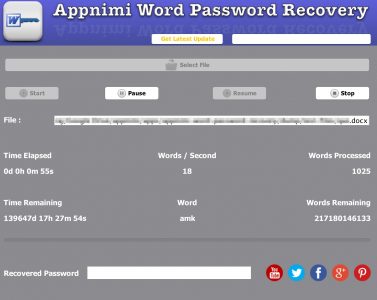
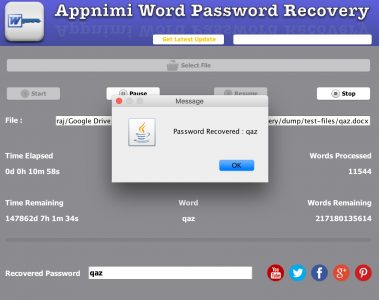
Here are some of the screenshots of Appnimi Word Password Recovery in action
How to Use Appnimi Word Password Recovery
Here are the basic steps to get started with Appnimi Word Password Recovery

Select the Protected File whose password is to be recovered.

You can choose the optional parameters such as the Recovery Process, Prefix, Suffix, Character sets. Once done Click on the Start Button.

The App starts preparing for the recovery process. It might take some time for the process to complete and the actual recovery process to start.

After the recovery process starts you can see the detailed progress report at the bottom half of the app.

You can Pause or Stop the recovery any time you want.

The recovered password is shown in a popup window.
Featured on Leading Websites
We have been featured on some of the leading websites of the world








Order Appnimi Word Password Recovery
Time to get started with Appnimi Word Password Recovery
Time Elapsed Report
Word count Report
Dictionary method of recovery
1 Month Free Support
3 Months Free Upgrade
Single User License
Time Elapsed Report
Word count Report
Dictionary method of recovery
Bruteforce method of recovery
Prefix & Suffix
Auto Save recovery session at regular intervals
Pause & Resume recovery process
3 Months Free Support
1 Year Free Upgrades
Single User License
Time Elapsed Report
Word count Report
Dictionary method of recovery
Bruteforce method of recovery
Prefix & Suffix
Auto Save recovery session at regular intervals
Pause & Resume recovery process
Pending Time Report
Pending Combination Report
Custom Characters for Bruteforce
1 Year Free Support
Lifetime Free Upgrade*
Floating License
Single User License

-
Editor Choice Awards
Here are some of the editor choice awards received for developing high quality apps

-
5 Star Awards
5 Star awards received for developing apps with excellence
-
Clean and Secured App Awards
Here are some of the awards received for no virus,no adwares and for being a secure app
-
Compatibitlity Awards
Here are some of the awards received for being compatible with various platforms











Download Appnimi Word Password Recovery
Here you can download the package for Appnimi Word Password Recovery.
Release History
Here are the Release Notes and Dates for Appnimi Word Password Recovery
Version 3.5.5
15 Dec 2018
-
Major Bug Fixes
Version 3.5.2
11 July 2018
-
Bug Fixes for 64 bit.
Version 3.5
04 Nov 2017
-
Floating License support added to Enterprise Edition
Version 3.4
17 July 2017
-
Bug Fixes
Version 3.1
25 October 2016
-
Refreshing change to the user interface
-
Minor Bug Fixes
Version 2.5
31 July 2014
-
Major Change in User Interface. Now it is more user friendly
-
Now get upto date report on the status of recovery process
-
Time elapses,Time remaining,Combinations Remaining
-
Pause and Resume the recovery process
-
Resume the recovery process at same point, even after you have shutdown the computer
Version 2.0
20 March 2014
-
Refreshing change to the user interface
-
Better Reports
-
Minor Bug Fixes
Version 1.1
18 September 2013
-
Improved User Experience
Version 1.0
25 December 2010
-
First Release
FAQ
Here is the list of some common questions
Question : What is Dictionary Method of Recovery?
Answer:
In Brute Force method of Recovery the software will use a previously prepared list of common passwords. These password are stored in a file. Success of this method depends on the assumption that the password will be a commonly used password. There are lot of dictionaries of words available online.
Question : What is Brute Force Method of Recovery?
Answer:
In Brute Force method of Recovery the software will generate a list of passwords from a combination of characters. These generated passwords are tried on the encrypted files. Success of this method depends a lot on the characters selected.